Connect to the network in IU Bloomington or IU Indianapolis campus housing
On this page:
Before you begin
You need a University account before you can connect to the IU network. If you are a student, you receive that account when you create your first computing accounts, or during orientation. If you are a visiting scholar or faculty member, make arrangements with your sponsoring department for a University account.
- Non-FCC compliant devices are not allowed on the IU network; see Devices permitted on the IU network.
-
At IU Bloomington, you may operate a properly configured, FCC-approved wireless access point (WAP) as an exception to Extending the University Data Network (IT-19) and Wireless Networking (IT-20) from the University Information Policy Office (UIPO) only if your residence is listed at Wireless Networking: Temporary Exception 2 (ITE20-02). Once the campus wireless network is available in your residence, this exception will no longer apply and you will need to remove your WAP from the network.
See Configure a wireless access point at IUB if your campus residence does not yet have wireless.
Wireless connections
Connect your device to eduroam, if available.
If eduroam is not available, and you want to configure your own wireless access point, see Configure a wireless access point at IUB if your campus residence does not yet have wireless.
Wired (Ethernet) connections
Before you can make a wired connection
Equipment you need
- Your device will need a 10BASE-T or faster Ethernet adapter or card to connect to the IU network. Your laptop or desktop may have an Ethernet card installed; an 8-pin Ethernet port will look similar to the following:

RJ45 Ethernet port - You will also need a network cable:
- IU Bloomington: To determine what type of Ethernet cable needed, see Ethernet cables for Bloomington residences.
If your room uses a standard Ethernet cable, you will need to provide the cable yourself. If your room uses the proprietary IU Ethernet cable and it is not provided upon arrival, TCC is open for IU crossover cable pickups.
- IU Indianapolis: In Ball Residence Hall, the Campus Apartments on the Riverwalk, North Hall, and the Tower, use a standard Ethernet cable.
Purchase a standard Cat 5 or Cat 6 Ethernet straight-through patch cord at any electronics store.
- IU Bloomington: To determine what type of Ethernet cable needed, see Ethernet cables for Bloomington residences.
Make a wired connection
Wired connectivity through Aruba access points
Aruba is the brand of access point (AP) installed in IU campus buildings and residential spaces. Aruba devices transmit wifi signals to connect to eduroam, IU PublicNet, and IU Guest. Ethernet ports are available on the Aruba for wired connections. IU wall cables will not work on Aruba devices.
The first port on Aruba devices will not transmit signal to connect to IU networks. To use a wired connection, plug a straight-through cable into one of the subsequent ports (see image below).
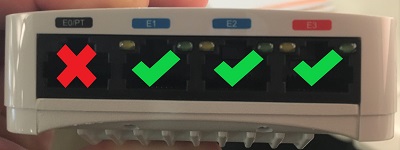
Aruba 303H access point
Wired activity through a data jack
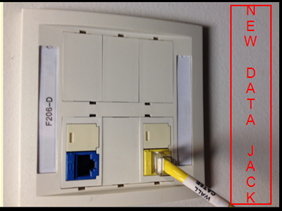
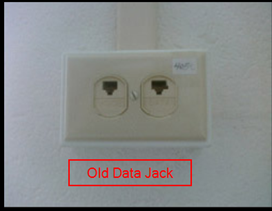
If you do not have an Aruba device in your residential space, there should instead be one or two data jacks in each room. Because of the age differences between different residential buildings, you may see newer or older data jacks.
For all data jack types, always be sure that Ethernet cables are plugged into the data jack and not the voice jack.
| Data jack type | Description | Example |
|---|---|---|
| Newer data jack | Newer data jacks are color-coded for voice or data:
|
 |
| Older data jack | Older jacks are not color-coded, but the ports are labeled as "VOICE" or "DATA". |
 |
Get help
If you are having problems connecting your computer, contact the Support Center. If necessary, Support Center staff will forward information about the problem to TCC consultants, who can do the following, as needed:
- Install appropriate vendor-supplied Ethernet card drivers compatible with your supported operating system. You must have your Ethernet card already installed before the consultant arrives.
- Check the data jack to make sure it's working.
TCC consultants will not do the following:
- Install hardware or assist you with installing your own hardware. This includes scanners, printers, CD or DVD drives and burners, sound cards, graphics cards, or any peripherals.
- Provide a hub to connect multiple computers within your on-campus residence. They will help you configure a hub you supply, but it must meet IU's IT policies. For more, see Connect multiple computers to a single data jack in IU Bloomington or IU Indianapolis campus housing.
- Install/upgrade operating systems or applications, including Microsoft 365 apps. For this type of assistance, contact your campus Support Center. For more, see Recommended Windows operating systems at IU.
Further information
- At IUB, once you are connected to the network, you can print from your campus housing residence to your Residential Technology Center's (RTC's) network printer.
- Use a surge protector to protect your computer, printer, peripherals, and other electronic equipment from power surges.
This is document cafw in the Knowledge Base.
Last modified on 2024-04-17 13:45:33.